
Overview
- From time to time shipping carriers change the URL needed to track packages.
- When this occurs, you must manually update the tracking link information stored in the program.
- The tracking links are used when sending tracking emails and when Stone Edge opens the current tracking status via the tracking number.
Update Tracking URL
- Settings -> Shipping Functions -> Shipping Setup.
- Click “Tracking Options”.
- Select the “Shipper” whose information you wish to update.
- See the table under Tracking Links for the current tracking prefixes and suffixes needed for each carrier.
- Copy and paste any updated data into the corresponding boxes.
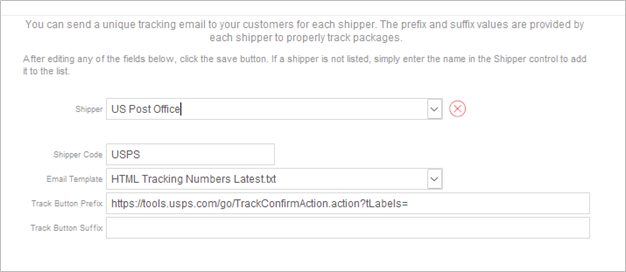
- Click “Save” to confirm changes.
- Repeat steps 3-6 for each Shipper.
- Use “X” in top-right corner to close “Shipping Settings” screen.
Tracking Links
|
Carrier |
Tracking URL Prefix |
| USPS | https://tools.usps.com/go/TrackConfirmAction_input?qtc_tLabels1=
OR for multiple tracking numbers: https://tools.usps.com/go/TrackConfirmAction.action?tLabels= |
| UPS | https://www.ups.com/track?loc=en_US&tracknum= |
| FedEx | https://www.fedex.com/fedextrack/?trknbr= |